What a MAG box is
MAG boxes are set-top boxes made by Infomir for IPTV. Most of them run Infomir’s own Linux software rather than Android, which is why they feel simple: switch on, the portal loads, and the remote goes straight to live TV. Hotels and IPTV fans have used them for years, and many homes in the UK and Europe still have one under the TV. This guide covers everything you need for MAG box IPTV in 2026: the portal, the MAC address, the setup and the fixes.
The thing that makes a MAG box different from a Firestick or an Android box is the way it logs in:
- No app to install. The box opens the provider’s portal directly, like a website made for the TV.
- No username or password. The provider recognises the box by its MAC address, a unique hardware code.
- One box, one subscription. Because the login is tied to the MAC address, the subscription works on that box only. A new box needs a new MAC address registered.

What an IPTV portal is
An IPTV portal is a web address on the provider’s server that a MAG box, or an app that works like one, loads to show channels, films, series and the TV guide. Many providers build their portals on the Stalker middleware, so you will also see the words “Stalker portal” or “MAC portal”. They mean the same thing.
| Login type | What you enter | Typical devices |
|---|---|---|
| Portal (MAC) | A portal URL; the box’s MAC address identifies you | MAG boxes, Formuler boxes, some Android apps |
| Player API (Xtream Codes) | Server URL, username and password | IPTV Smarters Pro, TiviMate, IBO Player Pro |
| M3U | One playlist link | Almost every IPTV player |
None of the three is better in picture quality: the channels are the same. A portal is the most locked-down, because it only works on the registered device. The Player API is the easiest to move between apps, as our IPTV Smarters Pro guide shows, and the M3U link is explained in our M3U playlist guide.
A portal URL on its own is useless to anyone else: without your registered MAC address the server refuses it. That is why you should never buy “portal + MAC lists” shared online. They belong to other people’s subscriptions and stop working without warning.
How to find your MAG box MAC address
Every MAG box has its MAC address printed on the label underneath. It has six pairs of characters, and on Infomir boxes it usually starts with 00:1A:79.
- On the label: turn the box over and look for “MAC”. Ignore the serial number next to it.
- On the screen: if the portal does not load, the box usually shows its MAC address on the error page.
- On a Formuler box: MYTVOnline 3 shows its own MAC ID under Content Manager, Content Sources, Add Portal, and on the label on the back, according to Formuler support. Send that ID, not the network MAC.
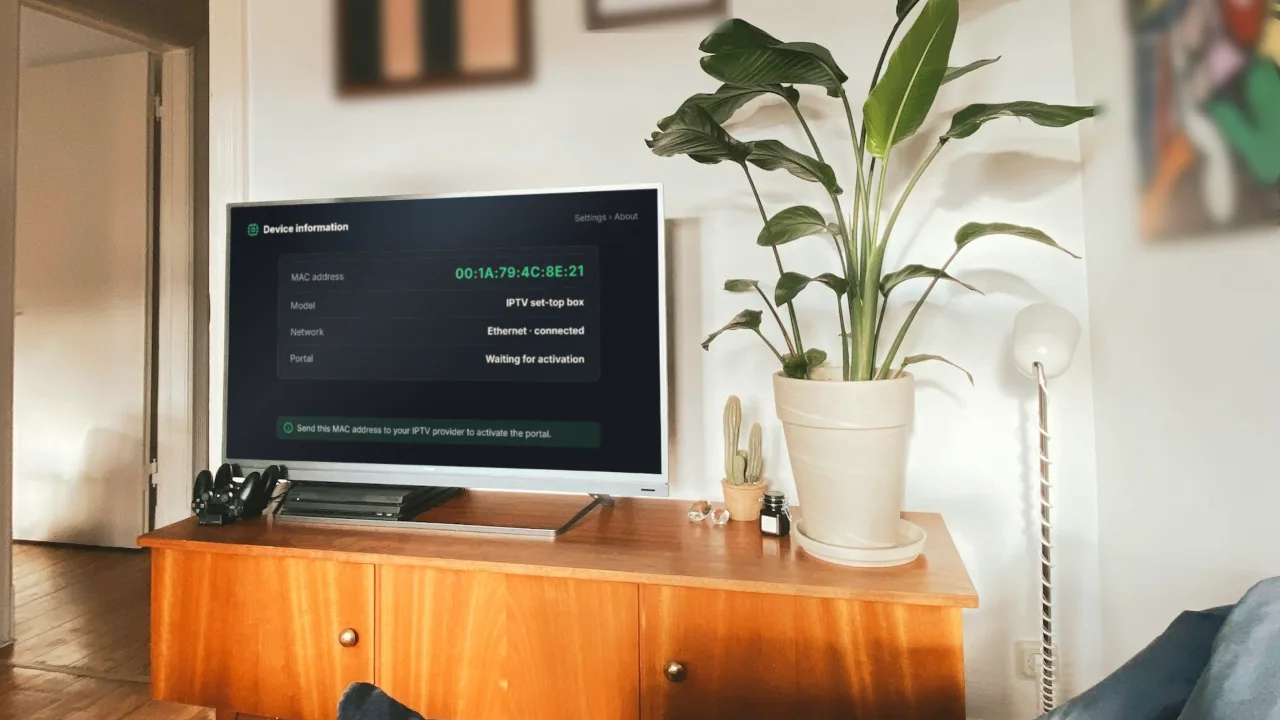
Confusing the letter O with the number 0, or B with 8. MAC addresses only use the numbers 0–9 and the letters A–F, so an O is always a zero. Send a photo of the label if you are not sure.
How to set up an IPTV portal on a MAG box
The steps below follow Infomir’s own portal documentation for its Linux boxes. Menu names can differ slightly between firmware versions.
- 1
Send your MAC address to the provider
Wait until the provider confirms that the MAC address is active and sends you the portal URL.
- 2
Open the portal settings
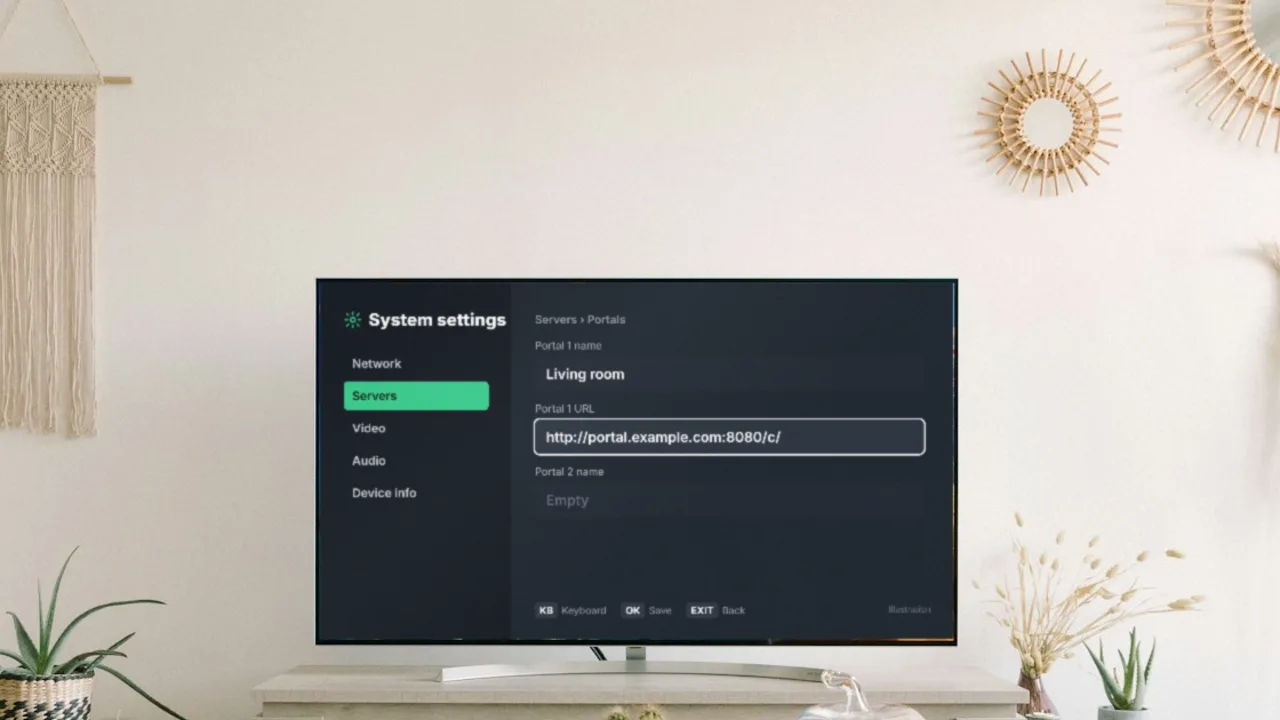
On the box, open System settings, then Servers, then Portals.
- 3
Name the portal
Press KB on the remote to open the keyboard and type any name in “Portal 1 name”, such as “Living room”. The name is optional.
- 4
Enter the portal URL
Move down to “Portal 1 URL”, press KB again and type the address exactly as sent, including http:// or https://, any port number and the final slash. Press Enter on the on-screen keyboard to save.
- 5
Restart the portal
Press Exit, then choose Restart Portal in System settings. The portal loads with your channels. If it does not, restart the box itself.
MAG portal not loading? Common fixes
| What you see | Likely cause | Fix |
|---|---|---|
| “Portal not found” or a blank page | A typo in the URL | Check every character, the port and the final slash |
| “STB blocked” or “MAC not found” | The MAC is not active yet, or was sent wrongly | Send a photo of the label to your provider |
| Stuck on “Loading portal” | No internet on the box | Check the cable or Wi-Fi in Network settings, then Restart Portal |
| 4K channels will not play | The box or firmware does not decode the format | Update the firmware or watch the FHD version |
| Worked yesterday, not today | Subscription expired or portal moved | Ask your provider for the current portal URL |
For buffering on any device, the checks in our IPTV setup guide also apply to MAG boxes.
Which MAG box to buy in 2026
Infomir has moved several older models to its discontinued list, including the popular MAG524. The current range on Infomir’s website is:
| Model | System | Memory | Good to know |
|---|---|---|---|
| MAG540w3 | Linux | 1 GB RAM, 4 GB storage | 4K and AV1; Wi-Fi built in |
| MAG544w3 | Linux | 1 GB RAM, 4 GB storage | 4K and AV1; Wi-Fi built in |
| MAG555 | Google TV | 2 GB RAM, 16 GB storage | Runs Android apps as well as portals |
Two details are worth checking before you buy. Infomir lists HEVC (H.265) as optional on its Linux boxes, so make sure the box you buy plays HEVC if you want 4K channels. And the Linux models have a 100 Mbps Ethernet port, which is still plenty for live 4K, as our 4K IPTV guide explains.
If you do not own a MAG box yet, a Google TV or Android TV box with a player app is usually the more flexible choice. Our guide to the best IPTV box compares the options.
MAG box IPTV: pros and cons
| Pros | Cons |
|---|---|
| Very simple remote and menus, good for older viewers | Locked to one box: moving TV means registering a new MAC |
| No app updates or app stores to manage | Few or no streaming apps, such as Netflix, on the Linux models |
| Fast channel switching on a stable line | Only 1 GB of RAM on the Linux models |
| Login cannot be copied to another device | Fewer extra features than apps like TiviMate |
Using a MAG box with 4K IPTV Encoder
4K IPTV Encoder works with MAG boxes and other portal devices, as well as with the Player API (Xtream Codes) and M3U logins for apps.
| Check | 4K IPTV Encoder |
|---|---|
| Portal (MAC) login | Yes, for MAG and other portal devices |
| Other logins | Player API (Xtream Codes) and M3U |
| What we need | The MAC address on your box’s label |
| Connections | One active connection per plan |
| Test first | One-month Discovery plan at €11.99, instead of a free trial |
| Plans | €11.99 for 1 month, €19.99 for 3, €29.99 for 6, €59.99 for 12 + 3 free, €85.00 for 24 + 6 free |
| Activation | About 5 minutes after payment |
Send us your MAC address on WhatsApp when you order, or a photo of the label if you prefer. We activate it and send back your portal URL with the steps for your model. More on choosing a plan is in our IPTV subscription guide, and the wider checklist is in our guide to the best IPTV providers.
MAG box and IPTV portal FAQ
What is a MAG portal?
A web address on the provider’s server that a MAG box loads to show your channels and TV guide. The box is recognised by its MAC address, so there is no username or password.
Do I need a username and password on a MAG box?
No. The provider registers your MAC address and sends a portal URL. That is all you enter on the box.
Can I use one IPTV portal on two MAG boxes?
Not at the same time with one plan. Each plan includes one active connection, and a portal login is tied to one MAC address. A second box needs a second subscription.
Can I change my MAG box?
Yes. Send your provider the MAC address of the new box so they can move your subscription to it.
Do MAG boxes support 4K IPTV?
The current models output 4K and decode AV1. Infomir lists HEVC as optional on its Linux boxes, so check that yours plays HEVC before relying on it for 4K channels.
Can I use a portal on a Firestick or Android box?
Some apps can log in to a portal with a MAC address, but most viewers find the Player API login simpler on those devices. Ask us which login suits your device.
MAC address in, portal URL back, done
MAG box IPTV is one of the simplest ways to watch live TV: send the MAC address, enter the portal URL, restart the portal, and the channels are there. Check that your box plays HEVC if you want 4K, keep it on a cable if you can, and never use portals shared online. For the bigger picture, start with our IPTV Europe guide, and send us your MAC address when you are ready.
See our plans