Check which Firestick you have before anything else
Most Firestick questions start with the same sentence: “I can’t find the app.” Nine times out of ten, the answer is the model. Amazon now sells two kinds of sticks that look almost the same but behave very differently.
To see yours, open Settings › My Fire TV › About. The first line is the device name.
| Model | System | Can it run IPTV player apps? |
|---|---|---|
| Fire TV Stick 4K Max | Fire OS | Yes, from the Appstore or with Downloader |
| Fire TV Stick 4K | Fire OS | Yes |
| Fire TV Stick (3rd gen) and Lite | Fire OS | Yes, in HD |
| Fire TV Cube | Fire OS | Yes |
| Fire TV Stick 4K Select | Vega OS | Amazon Appstore apps only, no sideloading |
Amazon’s developer pages say that every Fire TV Stick released after the 4K Select will also run Vega OS. If you are buying a stick for IPTV, read the box: a model that says only Appstore apps can be installed is a Vega OS model. Once you know your model, comparing the best IPTV for Firestick becomes much simpler.
Already own a 4K Select? Do not return it in a hurry. Tell your provider the model first. Some player apps are in the Appstore, and a good provider will tell you honestly whether yours works or whether another device makes more sense.
What makes the best IPTV for Firestick
A Firestick is a small computer hanging off the back of your TV. It has far less memory than a phone and it usually sits behind a metal screen, on Wi-Fi. A service that feels fast on a laptop can feel slow on a stick. The best IPTV for Firestick is built around these five points:
- A Player API (Xtream Codes) login. The app loads channels, the TV guide and the films in tidy categories. A huge M3U file can take minutes to load on a stick and freeze it on the way.
- A TV guide that loads quickly. A guide covering thousands of channels is heavy work for a Lite. Ask whether the provider can hide the countries you never watch. Fewer categories mean a faster stick.
- A stable stream at peak time. Test between 19:00 and 22:00, and at the weekend. A stick cannot hide a weak server.
- The right quality for your stick. 4K only makes sense on a 4K or 4K Max stick, on a 4K TV, with about 25 Mbps of steady broadband. On a Lite, choose the HD version of each channel.
- Support that knows Fire TV. A provider should know which app works on which model without searching for it.

For the wider checklist, including payment and refund rules, see our guide to the best IPTV providers in the UK and Europe. To check that a channel really plays in 4K on your stick, see our 4K IPTV guide.
Best IPTV apps for Firestick
The app is not the service. It is the remote control for it: the same login looks and feels different in each player. Three apps cover almost every Firestick home.
| App | Login | Cost model | Best for |
|---|---|---|---|
| IPTV Smarters Pro | Player API or M3U | Free app, paid extras on some versions | First setups and simple menus |
| TiviMate | Player API or M3U | Free to set up, paid Premium for most features | Live TV fans who use the guide every day |
| IBO Player Pro | Playlist added on the developer’s website | Free trial, then a one-time activation | Homes with smart TVs and sticks on one app |
If you are not sure, start with IPTV Smarters Pro: our IPTV Smarters Pro setup guide covers it step by step. It is the easiest to set up with a remote. Move to TiviMate when you want a faster, cleaner TV guide. Our full comparison of the best IPTV player apps covers four more players and other devices.
Installing a “modified” or “pro unlocked” version of a player from a random website. These copies are where malware hides. Install the player from the Appstore or from the developer’s own website only.
How to set up IPTV on a Firestick, step by step
This is the route for Fire OS sticks. It takes about ten minutes, most of it typing with the remote.
- 1
Install Downloader from the Appstore
On the home screen, search for Downloader and install it. It is a free file browser that lets you open an app’s official download address.
- 2
Show the Developer options
Go to Settings › My Fire TV › About and select your device name seven times, until the message “No need, you are already a developer” appears. Press Back once.
- 3
Allow Downloader to install apps
Open Developer options › Install unknown apps and switch Downloader on. Leave every other app off. On older Fire OS versions the setting is called “Apps from Unknown Sources”.
- 4
Install your player from its official site
Open Downloader, type the address published by the app’s developer, install, then delete the installation file when Downloader offers to.
- 5
Log in with Player API
Choose the Xtream Codes (Player API) login and type the name, username, password and server URL from your provider, exactly as sent.
- 6
Test it at a busy time
Watch a live channel in the evening, open the TV guide and try one film. If something is wrong, message support while you are still testing.

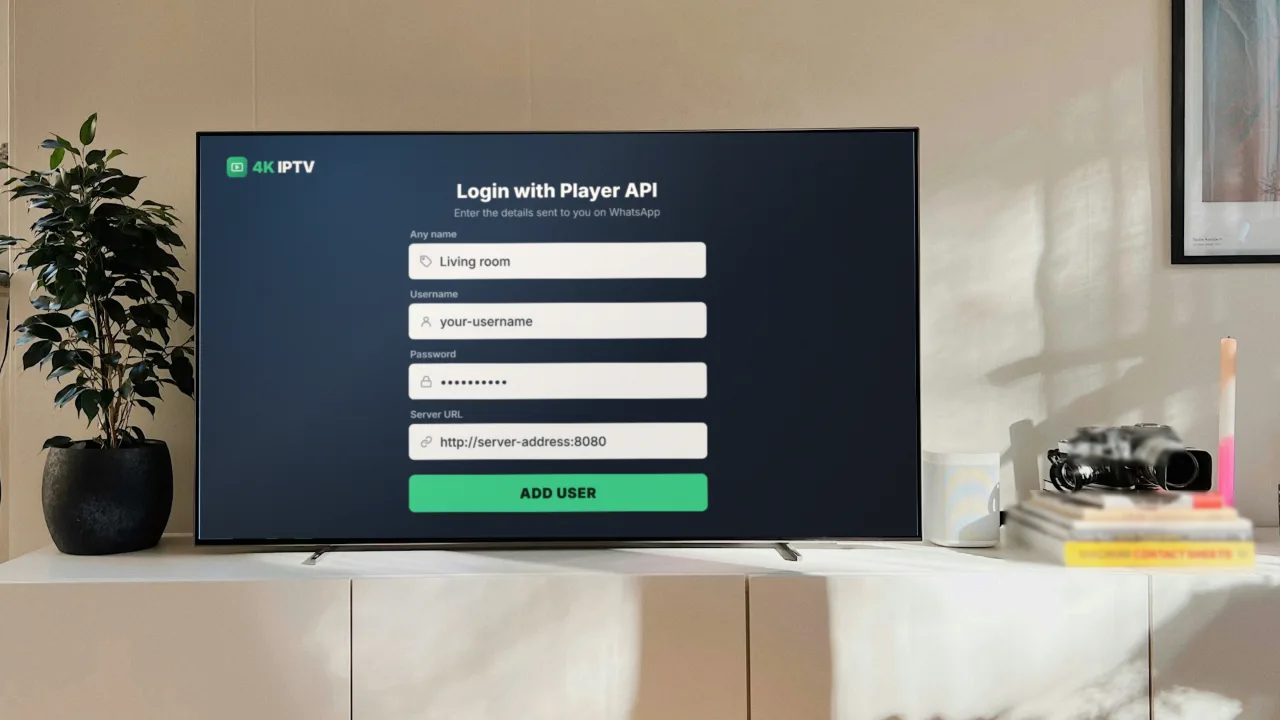
Most failed logins come down to one character: a space copied at the end of the password, a capital letter in the username, or a slash after the port in the URL. Type the details by hand rather than pasting them.
Using a smart TV, Android box or Apple device instead? Our IPTV setup guide covers every screen.
Firestick settings that stop most buffering
When a Firestick buffers, the service gets the blame. Often the stick itself is the bottleneck. Go through this list before you contact anyone:
- Power it from the wall. Use the plug and cable that came with the stick. A TV’s USB port often cannot supply enough power, and an underpowered stick slows down and reboots.
- Use the HDMI extender. A stick pressed against the back of a TV has poor Wi-Fi reception. The short extender cable moves it a few centimetres away, and that is often enough.
- Connect to 5 GHz, or go wired. 2.4 GHz Wi-Fi is crowded in flats and terraced houses. For 4K, an Ethernet adapter for Fire TV is the most reliable fix there is.
- Keep storage free. Uninstall apps you never open, and clear your player’s cache in Settings › Applications › Manage Installed Applications.
- Restart it once a week. Settings › My Fire TV › Restart clears the memory that builds up after days of use.
- Turn off what you do not need. In Settings › Preferences, data monitoring and app usage data collection can be switched off on most models.
Still buffering on a wired connection at 21:00? Then the stick is not the problem, and it is worth asking whether your provider is the right one. Our IPTV UK guide explains the broadband side for British homes. If you are thinking of moving from a stick to a box with a built-in Ethernet port, compare the options in our best IPTV box guide.
Free IPTV for Firestick: why it is a bad deal
Searches for the best free IPTV for Firestick usually end in one of two places: a free app that streams channels it has no right to, or a shared playlist that thousands of people use at once. Neither lasts.
- Security: Amazon’s Fire TV team has said that apps used for piracy can carry malware, and Amazon now blocks known piracy apps on Fire TV devices, as Cord Busters reported.
- Stability: free lists are overloaded at exactly the moment you want to watch, and they vanish without warning.
- No one to call: when a free list stops, there is no support and no refund.
There is free, legal TV on a Firestick: the official apps of public broadcasters and free ad-supported channels in the Appstore. They are simply not an IPTV subscription. If you want to try a paid service without risk, test it properly first. Our IPTV free trial guide explains how.
Firestick or another device?
For most homes, a Fire OS stick is the cheapest and simplest way to watch IPTV on a TV. It is not always the best choice:
- You own a Fire TV Stick 4K Select: check whether an Appstore player works with your login. If not, an Android TV or Google TV device, or the app on your smart TV, will be easier.
- You watch a lot of 4K sport: a device with an Ethernet port, or a 4K Max on a wired adapter, gives the steadiest picture.
- You have several TVs: one app that runs on all of them, such as IBO Player Pro, keeps things simple for the whole family.
4K IPTV Encoder on a Firestick
Our service works on Fire OS sticks with the Player API login, in IPTV Smarters Pro, TiviMate, IBO Player Pro and other players that support it.
| Check | 4K IPTV Encoder |
|---|---|
| Login | Xtream Codes (Player API) or M3U |
| Test first | One-month Discovery plan at €11.99, instead of a 24-hour free trial |
| Activation | Usually about five minutes after payment is confirmed |
| Connections | One active connection per plan |
| Setup help | On WhatsApp, for your exact Firestick model |
Still choosing the best IPTV for Firestick? Send us your model from Settings › My Fire TV › About before you order. If it is a Vega OS stick, we will tell you straight away which option works best. Longer plans lower the monthly price: see our IPTV subscription guide.
Firestick IPTV FAQ
How do I choose the best IPTV for Firestick?
Check your Firestick model first, then choose a service with a Player API login, a light TV guide and support that knows Fire TV. The best IPTV for Firestick is the one that stays stable on your own broadband at peak time, so test it for a month before a longer plan.
What is the best IPTV app for Firestick?
IPTV Smarters Pro is the easiest to start with. TiviMate has the best TV guide for people who watch a lot of live TV. IBO Player Pro suits homes that want the same app on every TV.
Can I install IPTV on the Fire TV Stick 4K Select?
Only with an app from the Amazon Appstore. The 4K Select runs Vega OS, which does not allow apps from other sources. Check with your provider which Appstore player works with your login.
Is Downloader safe?
Downloader is in the Amazon Appstore. The risk is what you download with it. Use it only for official addresses published by app developers.
Why does IPTV buffer on my Firestick?
The usual causes are weak 2.4 GHz Wi-Fi, a stick powered from the TV’s USB port, full storage, or an overloaded server at peak time. Fix the first three, then test the service on a wired connection.
Does IPTV on Firestick work in 4K?
Yes, on a Fire TV Stick 4K or 4K Max connected to a 4K TV, with about 25 Mbps of stable broadband and a channel that is broadcast in 4K.
Is there a good free IPTV for Firestick?
Free IPTV lists are unstable and often illegal, and some apps carry malware. Free, legal channels exist in broadcasters’ official apps, but they are not a full IPTV service.
Model first, then app, then service
The best IPTV for Firestick is not a single brand name. Get the order right and a Firestick is one of the best ways to watch IPTV: check your model, pick a player built for the remote, give the stick proper power and Wi-Fi, then test the service on a busy evening. For the bigger picture across Europe, start with our IPTV Europe guide. Tell us your Firestick model and we will help you set it up.
See our plans