What 4K IPTV really is
4K IPTV means TV channels and films streamed over the internet at 3840 × 2160 pixels, four times the detail of Full HD. On a big screen the difference is easy to see in grass, crowds and faces, which is why live football is the content most people buy 4K for.
What surprises many new customers is how little of an IPTV service is really in 4K:
- Most channels are Full HD (1080p). That is how broadcasters produce them. A provider cannot add pixels that were never filmed.
- 4K channels are usually separate entries. You often see the same channel three times, marked 4K, FHD and HD. Pick the one that suits your device and broadband.
- “4K” on a sales page is a label, not a guarantee. Some services call an upscaled HD feed “4K”. The only way to know is to check the stream yourself, which we explain below.

The four things you need for real 4K
Think of 4K as a chain. The picture is only as good as its weakest link.
| Link | What it must do | How to check |
|---|---|---|
| TV | Show 3840 × 2160, ideally with HDR10 or HLG | Model number on the back or in the TV’s settings |
| Device | Decode 4K HEVC (H.265) smoothly | Box or stick specifications |
| Connection | About 25 Mbps for live 4K, steady at peak time | A speed test on the TV itself, in the evening |
| HDMI | An HDMI port that supports 4K (HDMI 2.0, HDCP 2.2) | The port label on the TV, often HDMI 1 or 2 |
The device is where most homes go wrong. A Fire TV Stick Lite or an older HD stick plays the 4K channel, but only after squeezing it down to HD, or it stutters. Amazon’s 2023 Fire TV Stick 4K and 4K Max handle 4K with HDR10+, HLG and Dolby Vision; the 4K Max adds Wi-Fi 6E and 16 GB of storage, which helps with large channel lists.
Plug the stick or box into the HDMI port marked 4K, HDR or ARC on your TV. On many TVs only one or two ports carry full 4K at 60 frames per second, and the others stop at HD.
How much broadband does 4K IPTV need?
Speed advice for 4K varies, and for good reason: films and live sport are very different jobs.
- On-demand 4K films: Netflix recommends 15 Mbps or more for Ultra HD. A film can be compressed carefully in advance, so it needs less.
- Live 4K sport: fast motion at 50 frames per second is much harder to compress in real time. When the BBC first trialled live UHD at the 2014 World Cup, it needed about 36 Mbps, TechRadar reported. Modern HEVC encoding needs less, but 25 Mbps of steady speed is a safe target.
| What you watch | Steady speed to aim for | Data per hour (approx.) |
|---|---|---|
| One HD channel | 5–8 Mbps | 2–4 GB |
| One 4K film | 15–20 Mbps | 7–9 GB |
| One live 4K match | 25 Mbps | about 11 GB |
| 4K match + someone else streaming | 40–50 Mbps | depends on use |
The word that matters is steady. A line that tests at 70 Mbps at noon can fall well below 25 Mbps at 20:45 on a Saturday. Run the speed test on the TV device itself, at the time you actually watch. Our IPTV UK guide explains how broadband behaves at peak time in British homes.
Best devices for 4K IPTV
Every device below can play 4K IPTV well when it is set up properly. The choice depends on what you already own.
- Fire TV Stick 4K or 4K Max (Fire OS): the most common choice in the UK. Use 5 GHz Wi-Fi or an Ethernet adapter for live 4K. Our guide to the best IPTV for Firestick covers models and settings.
- Android TV and Google TV boxes: often have a real Ethernet port, which makes them the steadiest option for 4K sport. Our guide to the best IPTV box compares the main models.
- Smart TV apps: recent Samsung and LG TVs decode 4K well. The limit is the app: check that your player app is available in the TV’s store.
- Apple TV 4K: excellent picture, with fewer IPTV apps to choose from.
Phones, tablets and most laptops gain little from 4K: the screen is too small to see the difference, and the stream uses three times the data. Choose FHD there.
Settings that decide whether you really get 4K
A 4K device out of the box is often not set up for 4K. Three settings make the difference:
- 1
Set the output to 4K
In the device’s display settings, set video resolution to Auto or 4K Ultra HD. A box left on 1080p sends HD to the TV whatever the stream is.
- 2
Use “Adaptive” for HDR
Set dynamic range to Adaptive (or “match content”). The TV then switches to HDR only when the stream is HDR, and colours look right the rest of the time.
- 3
Match the frame rate
Turn on Match original frame rate if your device offers it. Live European sport is broadcast at 50 frames per second, and matching it removes the small judder some people notice in pans across the pitch.
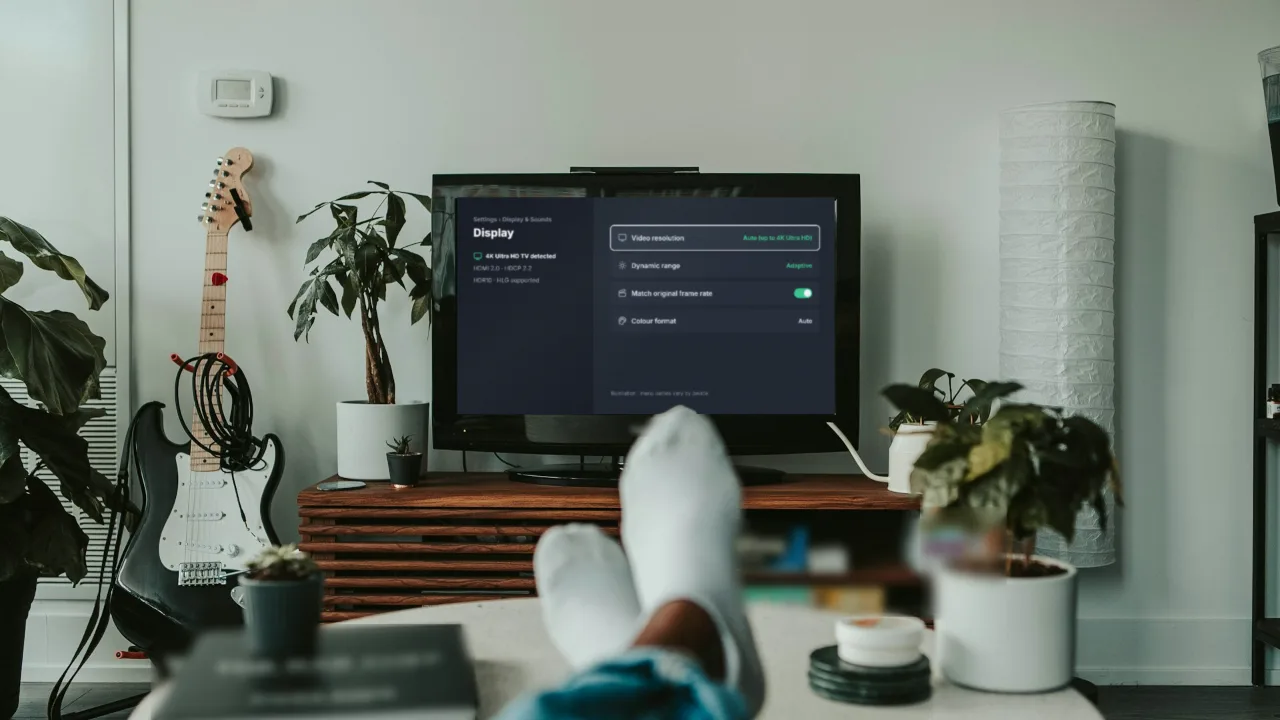
In the player app, also turn on hardware decoding if it is off. Our guide to the best IPTV player apps shows where the setting is in the main players.
How to check a channel is really in 4K
Do not trust the label alone. Two minutes of checking tells you more than any sales page:
- Open the player’s stream information. In most apps it is under the info or settings button while the channel plays. Real 4K shows 3840 × 2160. 1920 × 1080 means Full HD, whatever the channel name says.
- Press Info on the TV remote. Many TVs show the incoming signal, such as “2160p 50 Hz HDR”.
- Watch fine detail. On a real 4K football stream you can read the shirt numbers of players far from the camera and see individual blades of grass.
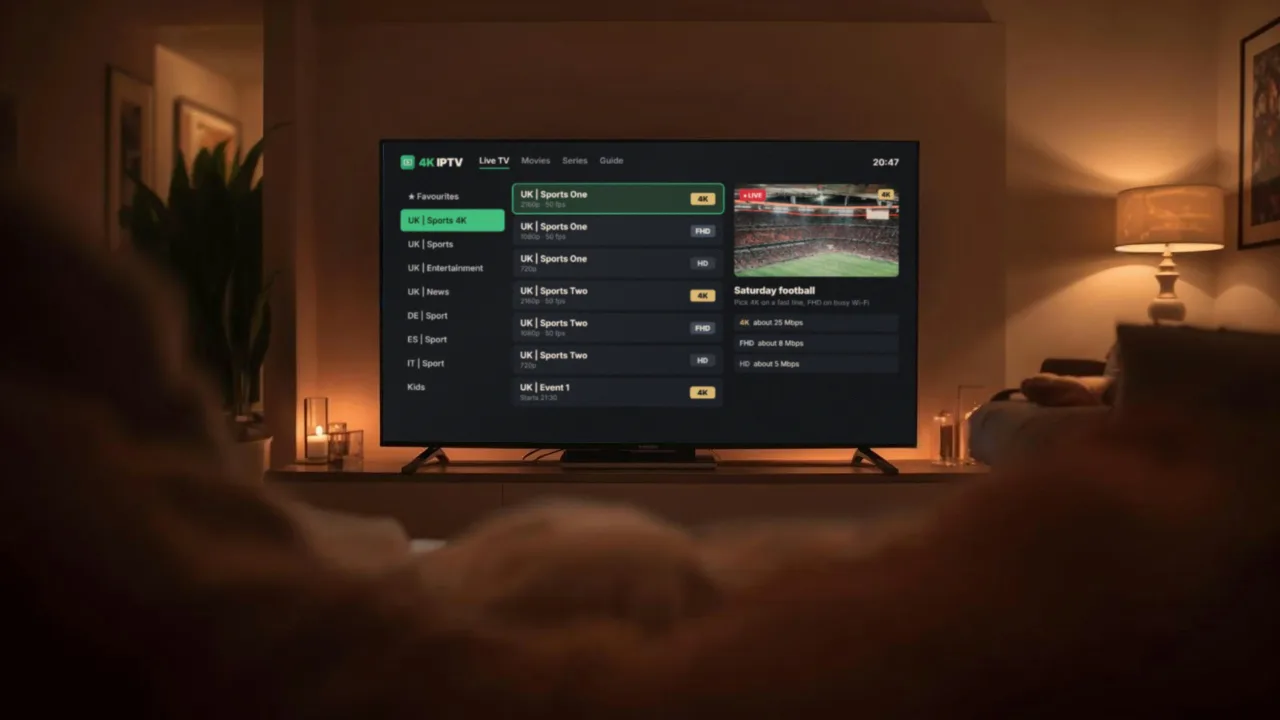
Always choosing the 4K version of a channel. If your Wi-Fi drops below about 25 Mbps during a match, the 4K stream buffers, while the FHD version would have played perfectly. A smooth FHD picture beats a 4K picture that freezes every few minutes.
Why 4K IPTV buffers, and what to do about it
4K exposes every weak point in a home network. If 4K stutters but FHD plays fine, work through this list:
| Cause | Fix |
|---|---|
| Wi-Fi too weak at the TV | 5 GHz or Wi-Fi 6, a mesh point near the TV, or best of all an Ethernet cable |
| Device too slow for 4K HEVC | Use a 4K stick or box; on a Lite or HD stick choose FHD |
| Stick powered from the TV’s USB port | Use the mains plug that came with it |
| Several streams at once | Count every screen in the house: two 4K streams need about 50 Mbps |
| Busy server at peak time | Test the same channel on a cable at 21:00; if it still buffers, ask the provider |
More fixes, device by device, are in the troubleshooting part of our IPTV setup guide.
How to choose a 4K IPTV subscription
When you compare a 4K IPTV subscription, look past the word 4K and ask specific questions:
- Which channels are really 4K? Ask for the categories or the events, not a total number.
- Is there an FHD and HD version of each 4K channel? You need a fallback for busy evenings.
- Is 4K included in every plan? Some services charge extra for it.
- Can you test before a long plan? 4K is the feature most worth testing on your own broadband.
Our guide to the best IPTV providers in the UK and Europe has the full checklist, and the cheap IPTV guide explains why the lowest price rarely comes with a stable 4K picture.
4K with 4K IPTV Encoder
Where a channel or event is broadcast in 4K, we list it as a separate 4K version, next to its FHD and HD versions, so you can pick the one that suits your screen and broadband on the night.
| Check | 4K IPTV Encoder |
|---|---|
| 4K channels | Labelled 4K, with FHD and HD versions alongside |
| Test first | One-month Discovery plan at €11.99, instead of a 24-hour free trial |
| Plans | From €11.99 for one month to €85.00 for two years (24 + 6 months free) |
| Connections | One active connection per plan |
| Setup help | On WhatsApp, including the 4K settings for your device |
Tell us your TV, device and broadband speed before you order, and we will tell you honestly whether 4K will work well in your home. The IPTV subscription guide helps you choose a plan length.
4K IPTV FAQ
What internet speed do I need for 4K IPTV?
About 15 Mbps for on-demand 4K films and about 25 Mbps of steady speed for live 4K sport. Add more for every other screen streaming at the same time.
Does a Fire TV Stick support 4K IPTV?
The Fire TV Stick 4K and 4K Max do. The Fire TV Stick Lite and the HD models do not output 4K, so choose the FHD version of each channel on those.
Are all channels in 4K on a 4K IPTV service?
No. Most channels are produced in Full HD. 4K is mainly used for major sport events and some films, which appear as separate 4K versions.
Why does my 4K channel look no better than HD?
Check the stream information: if it shows 1920 × 1080, the source is not really 4K. If it shows 3840 × 2160, check that your device output is set to 4K and that you are on a 4K HDMI port.
How much data does 4K IPTV use?
Roughly 7 to 11 GB per hour, depending on the content. A full football match in 4K can use more than 20 GB.
Is 4K worth it for IPTV?
On a TV of 55 inches or more, with a 4K device and steady broadband, yes, especially for sport. On smaller screens or busy Wi-Fi, FHD gives a picture that is almost as good and much more stable.
Can I get 4K IPTV in the UK?
Yes. 4K IPTV in the UK works on any broadband line that holds about 25 Mbps in the evening. Most UK fibre packages manage this easily; on an older copper line, test a live 4K channel at peak time before you choose a long plan.
4K is a chain, not a label
Real 4K IPTV happens when the TV, the device, the connection and the channel all support it at once. Check each link, set the device to 4K, test a live match in the evening, and keep the FHD version as your safety net. For the wider picture, start with our IPTV Europe guide. Tell us your setup and we will help you get the best picture from it.
See our plans